Handy Pen Font for Web Design
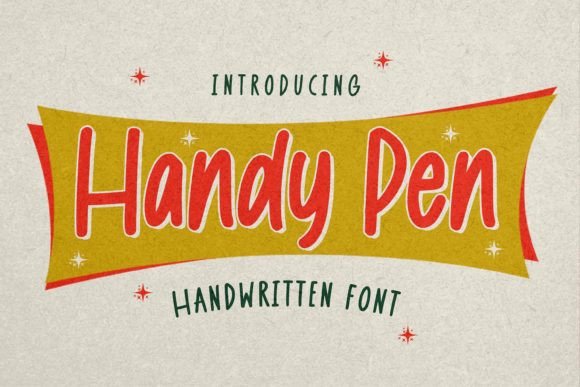
As a web designer, choosing the right typeface is crucial for creating engaging digital experiences. Handy Pen, a naturally textured handwritten font with a clear style and dramatic movement, offers a unique opportunity to elevate your design projects. Its expressive character makes it ideal for creative applications where visual storytelling matters.
With its organic feel and dynamic strokes, Handy Pen brings a human touch to digital interfaces. It’s not just about aesthetics; it's about how the font performs in real-world layouts. Whether you're designing a hero section or a call-to-action button, the way text flows can significantly impact user engagement and brand perception.
Visual Characteristics of Handy Pen
Handy Pen stands out with its natural texture and expressive strokes that mimic handwriting. This gives it a sense of authenticity and warmth, which is especially valuable in branding and marketing contexts. The font has a clear style that allows for readability without sacrificing personality.
The dramatic movement in each letter adds a sense of motion and energy to any layout. This makes Handy Pen particularly effective for headings, titles, and other elements that need to grab attention quickly. However, it’s important to consider how this movement affects legibility at smaller sizes or on mobile screens.
Applying Handy Pen in Web Design
When working on website headers, hero sections, or landing pages, using Handy Pen as a primary heading font can create an immediate emotional connection with users. Its unique style works well for creative portfolios, boutique online stores, and coaching websites where a personal touch enhances brand identity.
In call-to-action areas, Handy Pen can be used sparingly to highlight key phrases or buttons. The font’s distinctiveness helps draw the eye, making it easier for users to find and engage with important actions. However, it’s best suited for short phrases rather than long blocks of text due to its decorative nature.
For online shop banners or product landing pages, Handy Pen can serve as a decorative accent or support typography. Pairing it with a clean sans serif font for body copy ensures readability while maintaining a cohesive visual hierarchy.
Readability and Responsiveness
While Handy Pen excels in visual appeal, its readability on mobile screens requires careful consideration. At smaller sizes, the natural texture may become less legible. To maintain clarity, use it primarily for larger headings and ensure sufficient contrast against background colors.
Testing Handy Pen across different screen sizes and resolutions is essential. Responsive design principles should guide how and where this font is applied. When using it on dark backgrounds or image overlays, adjust the color and weight to ensure visibility without compromising the font’s character.
Font Pairing and Brand Identity
One of the most powerful aspects of using Handy Pen is its ability to pair well with other fonts. For example, combining it with a simple sans serif font like Helvetica or Arial creates a balanced look that’s both modern and approachable. This pairing is ideal for editorial designs, blog headers, and course sales pages where readability and style coexist.
If your brand has a more traditional or elegant feel, consider pairing Handy Pen with a serif font such as Georgia or Times New Roman. This combination can enhance the overall sophistication of your digital content while keeping the brand tone consistent.
For digital brand kits, Handy Pen can be a core element in defining a unique visual identity. It works particularly well in social media graphics, packaging design concepts, and promotional materials where a personal and artistic touch is desired.
Commercial Use and Licensing
Before implementing Handy Pen in client projects, online stores, or digital templates, ensure you have the appropriate commercial font license. Many display fonts require specific permissions for use in web design, so always check the licensing terms provided by the font creator.
Understanding the file formats available (such as webfont, OTF, TTF) and multilingual support is also important. If your project involves international audiences or multiple languages, confirm that Handy Pen supports the necessary characters and scripts.
For SaaS founders and marketers, integrating Handy Pen into brand assets can help differentiate your product from competitors. A strong typographic identity contributes to a memorable user experience and reinforces brand trust.
Whether you're designing a creative portfolio site or a high-conversion landing page, Handy Pen offers a versatile solution that blends artistry with functionality. By thoughtfully applying this font in your digital work, you can create visually compelling experiences that resonate with your audience and align with your brand’s voice.